How to Track Your Finances in Notion (Without Living in a Spreadsheet)
Notion finance tracker setup: organize bills, spending, and savings in one simple page, then review a fictional month without building a spreadsheet.
By Her's Notion Planner by Cosmo Suite · Editorial policy
Published · 7 min read

You open a finance template and find a dozen tables, formulas, and colorful views. A few minutes later, you are still deciding where a bill belongs. The first entry should feel quick, and the page should make the month easy to review.
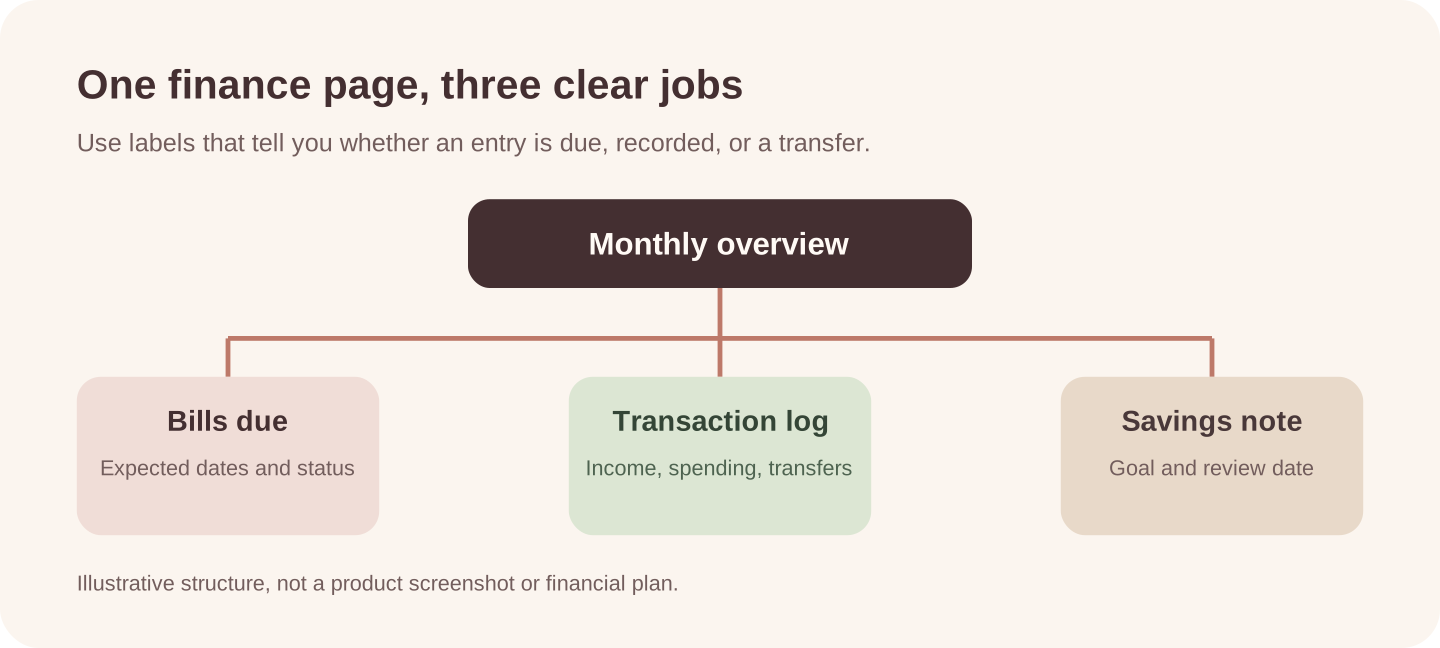
A finance tracker is a manual record of money activity you choose to enter, such as income, purchases, bills, and transfers. A Notion finance tracker can start as one database for money in and out, plus a short list of bills due soon. This setup records actual entries. A budget plans what might happen next. If you want a connected planning space, Her's Notion Planner includes a Finance hub among its five hubs. The examples here work in any Notion page or in a spreadsheet.
The sample month is fictional. It shows how to organize entries, not what you should spend or save. General information only, not financial advice.
In a Nutshell
- Use one transaction log for actual income, spending, and transfers.
- Keep bill due dates separate from transactions that have already cleared.
- Add only the views you use to answer a question about the month.
What belongs in a Notion finance tracker?
A finance tracker is a record of money activity you choose to enter. It can include income, purchases, bills, and transfers to savings. A budget is a plan for upcoming income and expenses. The Notion budget template guide focuses on planning around due dates and pay timing; this tracker guide focuses on recording and reviewing what happened.
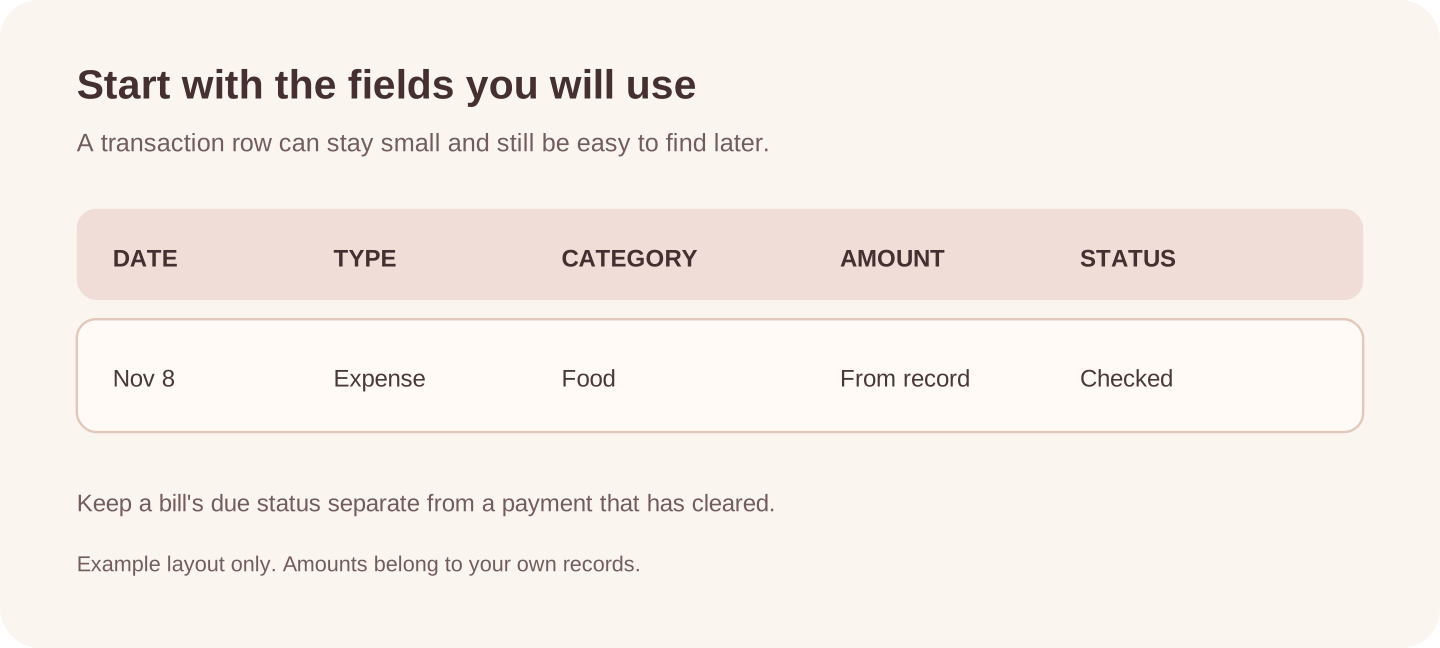
Start with four fields for each entry: name, date, type, and amount. A category such as housing, food, or transport helps you group records later. Notion's database guide explains that each database item is its own page and that properties can include dates and numbers.
You can keep bills in the same log if each row has a clear type and status. Some people find a separate bill list easier because a due date is a reminder, while a transaction is a record of money that moved. Keep those meanings distinct so an unpaid bill does not look like a completed payment.
Which Notion finance tracker setup fits your month?
Choose the smallest layout that helps you find the information you need. You can add structure after you have used the first version for a while.
| Setup | What it includes | A good fit when | Watch for |
|---|---|---|---|
| Simple page and table | A short transaction list with date, type, category, and amount | You record a few entries and read them in order | Manual totals can be easy to miss |
| One transaction database | Each entry has properties; a saved view filters by month or type | You want to sort and group a growing list | More fields mean more upkeep |
| Month page with linked views | A page for the month plus views of bills, transactions, and goals | You revisit several kinds of information together | Related views need clear labels so entries are not duplicated |
Notion's table view guide distinguishes a simple table from a database table with database functions. Its views guide covers filtering, sorting, and grouping database entries. If you only need a few lines, choose the simple page. If you want a monthly view, start with one database and one filter.
Build a transaction log with a few properties
Create a database and begin with the fields you will use. Notion's guide to database properties describes properties such as dates, numbers, and select options. You can add a category property to separate spending types or a status property for bills.
The CFPB's spending-tracker worksheet uses dates and categories to organize recorded amounts. A Notion version can use the same basic labels, with fields you choose to maintain.
| Property | Example | What it helps you see |
|---|---|---|
| Name | Electricity bill | Which transaction or bill the row describes |
| Date | 12 Nov | When it happened or is due |
| Type | Income, expense, transfer, or bill | What kind of entry it is |
| Category | Home, food, transport | How you want to group entries |
| Amount | The amount from your record | The value for that row |
| Status | Planned, paid, or checked | Whether a bill still needs attention |
Use the label that matches what you are recording. A savings transfer is a movement between places you keep money, not a purchase. A bill can be marked due before it is paid, then updated when your statement or account confirms it cleared.
Choose categories that help you answer a question. “Home,” “food,” and “transport” may be enough for a personal month. A separate category for every shop can turn the tracker into a long tagging task. If you cannot remember which category to pick, combine similar ones and keep a short note for an unusual item. The names are yours; a category list should reflect how you review your own records.
A fictional month shows how entries stay distinct
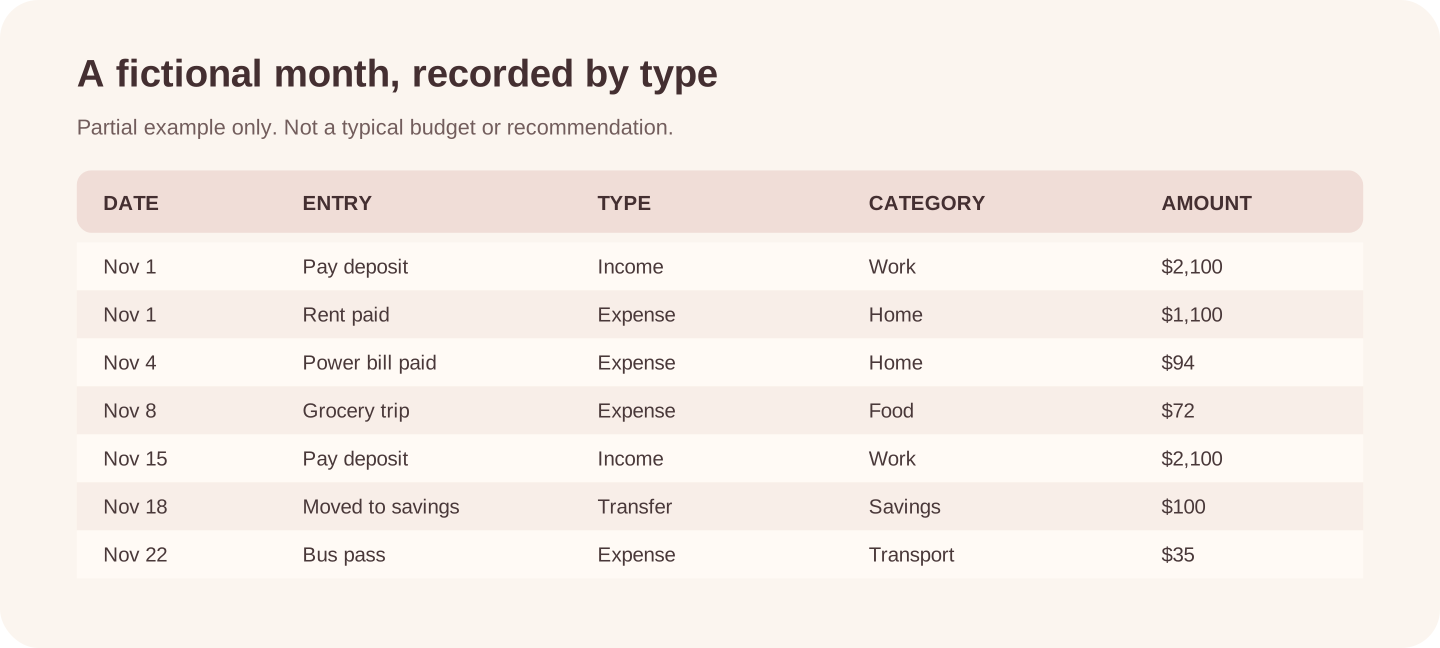
Here are sample rows for an imaginary November. The amounts and entries are invented for illustration. This is a partial log, not a complete budget, statement, or recommendation.
| Date | Entry | Type | Category | Amount |
|---|---|---|---|---|
| Nov 1 | Pay deposit | Income | Work | $2,100 |
| Nov 1 | Rent paid | Expense | Home | $1,100 |
| Nov 4 | Power bill paid | Expense | Home | $94 |
| Nov 8 | Grocery trip | Expense | Food | $72 |
| Nov 15 | Pay deposit | Income | Work | $2,100 |
| Nov 18 | Moved to savings | Transfer | Savings | $100 |
| Nov 22 | Bus pass | Expense | Transport | $35 |
The type column helps keep a savings transfer separate from a purchase. The category column makes it easier to filter the expense rows for Home or Food. You can add more detail in a note, but avoid entering account numbers or login credentials.
An actual finance tracker should be checked against your bank or credit union records. If an entry is missing or a bill is still pending, update its status after checking the source. The Notion page is your organized record of what you enter.
Keep bill reminders separate from cleared transactions
A bill list answers “what is due next?” A transaction log answers “what has happened?” You can keep the two as separate databases or use one list with a status that makes the difference clear.
For a separate list, use a bill name, due date, expected amount, and status. After the payment appears in your account, add or link the transaction and mark the bill paid. If the payment amount changes, keep the original estimate in a note only when that history helps you.
This distinction also helps with subscriptions and annual renewals. A reminder can show the next date without pretending the charge has already occurred. If you already use a Notion budget, keep planned items in its view and completed entries in the log. The two pages can support the same monthly review while keeping their jobs clear.
Add a monthly view when the log grows
When entries become hard to scan, make a saved view for the month you want to review. Filter by date and sort the results. You can also group rows by category if that helps you find them.
One database can hold entries across several months. A saved monthly view can show a smaller slice while leaving the full record in place. Use the date property for that filter and give the view a plain name, such as “November entries.” If you sort newest-first, you can see recent activity without changing the saved record. You may also keep a second view for bills still marked due, but add it only if you check it.
Begin with one filter, such as dates within the month. Add a second view for bills that are still due only if you use it. Too many dashboards can make it harder to remember which one has the latest information.
At the end of the month, check the log against your records and correct entries that are missing or miscategorized. Then decide whether a category, field, or reminder earned its place. This review is about keeping your record useful, not grading the month.
If you like money notes alongside other life plans, Her's Notion Planner has a Finance hub within its five-hub space. Check the specific contents against the fields you want to maintain.
What a Notion finance tracker cannot tell you by itself
A manual tracker shows the information you enter. It does not confirm that every transaction is present or that an account balance is current. Check your financial institution's records for actual balances, cleared payments, and transaction details.
The tracker also cannot decide what is affordable for you. It can organize bills, spending, and savings notes in one place, but your circumstances and obligations determine the choices. Keep the system small enough that you can maintain it without adding sensitive login or card information.
For a wider view of how a planning page can stay visually calm as it fills up, see our guide to choosing an aesthetic Notion template.
Where Her's Notion Planner fits
Her's Notion Planner includes five hubs: Productivity, Wellness, Lifestyle, Learning, and Finance. It also includes Life Areas and goals with real-time progress, plus dashboards for desktop, tablet, and phone. The approved contents do not name a dedicated finance tracker or automatic bank connection.
If you want a connected space for finance alongside other life areas, review the Her's Notion Planner product page and compare its listed contents with your needs. You can also build the transaction log above in a blank Notion page or use a spreadsheet. Choose the format you can update and verify against your own records.
Why Trust This Article
Her's Notion Planner is published by Cosmo Suite. We checked Notion's official database and table guidance on 2 November 2026. The sample month is fictional and partial; it does not represent a typical household or recommend spending amounts. Product details follow the approved contents list.
Our about page identifies the publisher, and our editorial policy explains how we check posts.
Frequently asked questions
What should a Notion finance tracker include?
Start with a date, amount, type, and category for each transaction. Add a separate bill list for due dates and a savings-goal note only if those help you review the month. Keep the first version small.
Can Notion track expenses?
Yes. A Notion database can store entries with properties such as dates, numbers, and categories. You enter or update the information yourself unless you set up a separate supported integration.
Is Notion good for tracking personal finances?
It can organize a manual record of bills, spending, and goals. It is useful if you like maintaining a flexible page, but your financial institution's records remain the source for actual balances and transactions.
What is the difference between a budget and a finance tracker?
A budget sets a plan for money you expect to receive and spend. A finance tracker records what happened, such as a bill paid or a purchase made. You can use both, but one does not replace the other.
Can I use a simple Notion table for expenses?
Yes. A simple table works for a short list you read from top to bottom. Use a database when you want to filter entries by date or category, sort them, or view them in another format.
Should I store bank details in a Notion finance tracker?
A tracker does not need account numbers, passwords, or card details. Keep those credentials out of the page and check transactions in your financial institution's account.